03 December 2007

Thing 20: You too can YouTube

Listen to this podcast [1:58]-->powered by ODEO


Within the past year online video hosting sites have exploded allowing users to easily to upload and share videos on the web. Among all the web 2.0 players in this area, YouTube is currently top dog serving up over 1 million video views a day and allowing users not only to upload their own video content easily, but also embed clips into their own sites easily.

Do some searching around YouTube yourself and see what the site has to offer. You'll find everything from 1970s TV commercials and 60s music videos to library dominos and kids singing about bloopers here. Of course, like any free site you’ll also find a lot stuff not worth watching too. But that doesn’t mean you shouldn’t explore and see for yourself what the site has too offer. :)

Discovery Exercise
  1. Explore YouTube & find a video worth adding as an entry in your blog.
  2. Create a blog post about your experience. What did you like or dislike about the site and why did you choose the video that you did? Can you see any features or components of the site that might be interesting if they were applied to library websites?

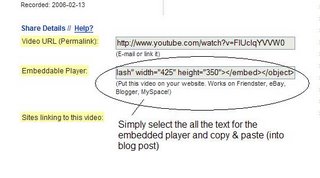
    OPTIONAL: Try placing the video inside your blog using the copy and paste code for the for "Embeddable Player.” Note: you'll need to use Blogger's Edit HTML tab when pasting this code.
Other popular video hosting sites:
NOTE: Videos, like music downloads, are bandwidth hogs. It is recommended that you complete this exercise during light internet usage times.

26 November 2007

Thing 19: Discovering Web 2.0 tools

Throughout the course of this Learning 2.0 program we’ve explored just a small sampling of these new internet technologies and websites that are empowering users with the ability to create and share content. But given time there are so many more we could explore. Current estimates place the number of web 2.0 tools at somewhere between 300 & 500 with only a handful emerging as market dominators. And although time will only tell which of these new collaborative, social networking and information tools will remain on top, one
thing is for sure, they're not going to go away (at least anytime soon).

For this discovery exercise, participants are asked to select any site from this list of Web 2.0 Awards nominees and explore it. With so many to choose from, it might be handy to first select a category that interests you (like Books or Personal Organization) and then simply select a tool/site to explore. Be careful to select a tool that is Free and that doesn't require a plug-in or download. The majority of these free, so this shouldn’t be a problem.

Discovery Exercise
  1. Select any site/tool from the list of Web 2.0 Awards nominees. (If you prefer to select from just the winners, here’s a link to the short list.)
  2. Explore the site you selected.
  3. Create a post about your discovery. What did you like or dislike about the tool? What were the site’s useful features? Could you see any applications for its use in a library setting?
Web 2.0 – with so much to explore, just start with ONE. :)

Thing 18: Web-based apps - they're not just for desktops

Listen to this podcast [2:30]-->powered by ODEO


The availability and use of online productivity web-based applications (think word processing and spreadsheets) has exploded over the past two years and for good reasons! These powerful applications provide users with the ability to create and share documents over the internet without the need of installed desktop applications. Some experts speculate that this emerging trend may mean the death to Microsoft Office and other software-based productivity tools, while others think web-based applications have their place, but not in the office. But no matter which side of the office suite platform you side with, on this both sides seem to agree; web-based apps have their place.

One large benefit to web-based applications it that they eliminate the need to worry about different software versions or file types as you email documents or move from PC to PC. Another bonus is that they easy accommodate collaboration by allowing multiple users to edit the same file (with versioning) and provide users the ability to easily save and convert documents as multiple file types (including HTML and pdf). And, you can even use many of these tools, such as Zoho Writer and Google Docs* (formerly known as Writely) to author and publish posts to your blog. It’s this type of integration with other web 2.0 tools that also makes web-based apps so appealing.

For this discovery exercise, participants are asked to take a look at a web-based word processing tool called Zoho Writer, create a simple document and then document your discoveries in your blog. If you're up to the challenge, you might even export your document as an HTML file or publish it through Zoho to your blog.

With Zoho and web-based applications, the possibilities are endless.

Discovery Resources

A short list of web-based productivity applications – Note: this list was authored in ZohoWriter and exported as HTML.

Discovery Exercise


  1. Create a free account for yourself in Zoho Writer.

  2. Explore the site and create a few test documents of two.

  3. Try out Zoho Writer’s features and create a blog post about your discoveries.
Optional: If you're up for the challenge, try using Zoho’s "publish" options to post to your blog.

* Note: You can also explore Google Docs (formerly known as Writely), Google's online word processer, as an option for this exercise. In October 2006, Google relaunched Writely (which it acquired in 2006) as Google Docs.

BTW: Here’s a document (viewable as a webpage) which was mocked up in Zoho about some of the features I found beneficial.

19 November 2007

Thing 17: Playing around with PBWiki

Listen to this podcast [1:53]-->powered by ODEO


"Sandbox" is the term that wikis often use to describe the area of the website that should be used for pure play. For this discovery and exploration exercise, PLCMC set up a whole Learning 2.0 Favorites wiki* that’s for nothing but play!

For this “explore-and-play-with-wikis” exercise, you are asked to add an entry or two to the PBwiki Learning 2.0 wiki. The theme of this wiki is simply “Favorites” : Favorite books, favorite vacation spots, favorite restaurants, favorite anything …all you need to do is play and add your thoughts. To mark your adventure on this site, you should add your blog to the Favorite Blogs page.

Discovery Resources

Discovery Exercise


  1. Access the PLCMC Learning 2.0 wiki and create a login account for yourself. The pssword for the wiki is listed on the front page.

  2. Add your blog to the Favourite Blogs page under "Australian Blogs". That's how we'll know that you've been there. It’s easy to do if you follow this simple syntax:

    Example:

    [ URL Title of blog]

    [ http://plcmclearning.blogspot.com Learning 2.0 ]
    With brackets [ ] and just a little typing, you’ve added a link - yup, it’s as easy as that! Just make sure you put your own blog address instead of the PLCMC address.

    OPTIONAL: Add a favorite or two to a few other pages (Favorite books, favorite vacation spot, etc). And, if you feel up to the challenge, you might even want to create a separate page for book review or short travel essay and link up to that.


  3. Create a post in your blog about the experience.

* NOTE: The PLCMCLearning Wiki was created using the free version of PBWiki, a tool that lets you create web pages that anyone can edit.

Thing 16: So what's in a wiki?

Listen to this podcast [1:49]-->powered by ODEO


A wiki is a collaborative website and authoring tool that allows users to easily add, remove and edit content. Wikipedia, the online open-community encyclopedia, is the largest and perhaps the most well known of these knowledge sharing tools. With the benefits that wikis provide the use and popularity of these tools is exploding.

Some of the benefits that make wikis so attractive are:

  • Anyone (registered or unregistered, if unrestricted) can add, edit or delete content.
  • Tracking tools within wikis allow you to easily keep up on what been changed and by whom.
  • Earlier versions of a page can be viewed and reinstated when needed.
  • And users do not need to know HTML in order to apply styles to text or add and edit content. In most cases simple syntax structure is used.
As the use of wikis has grown over the last few years, libraries all over the country have begun to use them to collaborate and share knowledge. Among their applications are pathfinder or subject guide wikis, book review wikis, conference wikis and even library best practices wikis.

Discovery Resources

Use these resources to learn more about wikis:
Discovery Exercise

1. For this discovery exercise, you are asked to take a look at some library wikis and blog about your finding. Here’s a few examples to get you started:

2. Create a blog post about your findings. What did you find interesting? What types of applications within libraries might work well with a wiki?

So what's in a wiki? Find out by doing some exploring on your own.